December 7, 2009
With over 4,500 downloads of the GUI version, and 1,700 downloads of the console version, the 2.0 release of iTunes Export appears to be a success. Thank you to all who have helped out.
This release provides a few bug fixes and incremental improvements based on the feedback received so far. Thank you to everyone who has helped out, and please reach out if you have issues or suggestions.
This release as a few fixes for both versions, including:
Read More
December 1, 2009
Like many experienced Java programmers, I’ve played with several other languages and platforms over time. While most development languages are not game changing on their own, they can have an impact on the speed and level of enjoyment of a developer. Development languages are like a carpenter’s tools. Most tools won’t change they house an experienced carpenter can build, but they may make the experience more enjoyable.
With that caveat in mind, I wanted to explore my (current) preferred toolchain, Scala and ActionScript (Flex). Not only are both languages powerful and enjoyable in their own right, their similar syntax and easy integration provide a powerful combination.
Read More
November 30, 2009
I’ve been struggling with my DSL connection for a while now. Over the past week it became intolerable, and I dug in to investigate this weekend.
I had been experiencing intermittent outages, which I wrote off as bad service (Ameritch and I have had issues in the past*). Over the past week I started experiencing significant packet loss (>30% on pings to the ISP’s DNS server), so I knew it was getting worse.
Read More
November 26, 2009
This release of iTunes Export provides some additional features requested after the 2.0 release. These features include:
The ability to override the file path separator used. This is useful when you will be using the playlist on a different operating system.
iTunes 9 File Structure. iTunes changed the file structure starting with version 9, with a separate ‘Music’ folder under the iTunes Media folder. This version now includes the Music folder as part of the musicFolder, excluding it from the path when using file copy with the iTunes Structure.
Read More
November 25, 2009
I host my site at GoDaddy, for better or worse. The site is comprised entirely of ‘static’ HTML pages at GoDaddy. The Blog is managed using Blogger, but it publishes HTML files via FTP to GoDaddy, and the rest of the content is HTML files I manage directly.
I wanted to avoid the redundant header/footer/etc. structures in my pages since I was editing them manually. So, I setup my site to parse the HTML files as PHP files, and then used PHP includes:
Read More
November 11, 2009
For a recent project I wanted to simulate an 80x24 terminal window in a Flex application. To accomplish this I needed a fixed width (monospace) font and the ability to size the text control for the current font. Here is what I did:
First, I needed a monospace (fixed width) font. You can embed your own fonts in a Flash SWF, but that was overkill for this effort. You could specify a specific font, such as ‘Courier New’ that is monospace. However, there can be issues if the client’s device does not have the specific font face. Device Fonts often serve as a fallback font if the specific font requested does not exist on the user’s device. In this case, I didn’t want to select a specific font, I just wanted the default monospace font. So I used the _typewriter font (the other types are _sans and _serif).
Read More
November 3, 2009
This release of iTunes Export marks a milestone and major transition of the development focus. The prior releases, 1.0-1.6 were all build using the Microsoft .Net Framework, which limited deployment to Windows. With this release, iTunes Export now fully support Windows and Mac OS X.
The Graphical User Interface version has been ported to Adobe Flex and is deployed as an AIR desktop application. The Command Line version is an update of the Scala version I developed earlier this year.
Read More
October 31, 2009
I’m reminded of the Semisonic song Closing Time today, and the quote “Every new beginning comes from some other beginning’s end”.
Today was my last day with my current employer, and I will soon begin not only a new job but also the process of relocating to Colorado. We’re not moving right away, but today is a major milestone.
It has been fun, and I will miss many aspects of my experience here, but my family and I are excited about the future.
Read More
October 28, 2009
Google announced plans to release a turn-by-turn GPS Navigation application for the new Motorola Android 2.0 (Droid) phone. This is significant enough, but CNET also reports:
However, Google is working with Apple on bringing it to the iPhone, and it’s not ruling out licensing the software to makers of portable navigation devices used in cars throughout the world, said Gundotra, vice president of engineering at Google for mobile and developers.
This could be a major disruptive force to Tom Tom, Garmin, and the entire mobile navigation industry. There is nothing like a free alternative to a
$99 iPhone Application (US Version) to shake things up, let alone the impact on the automotive manufacturers and their in-dash software needs.
Read More
October 28, 2009
Adobe AIR is the desktop runtime environment for deploying Flex applications. The main difference between a Flex application and an AIR application is that AIR applications are installed locally and have additional access to local resources, including the local file system, while a Flex application runs in the browser and is ‘sandboxed’.
I've been developing an AIR version of my
iTunes Export open source application. The original version was developed in .Net, making it Windows only. The AIR version will work across Windows and OS X, and will replace the existing .Net GUI.
As I prepare to release the first Beta I ran into the question of how to sign my AIR application. All Adobe Air applications must be signed using a digital certificate. There are a few companies that sell certificates that are recognized by Windows and OS X by default, and they charge $300/year and up. That is pocket change for any company selling an application but a pretty significant cost for an open source application that produces no revenue.
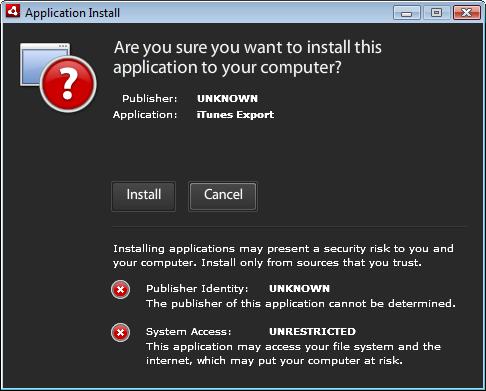
You can self-sign a certificate, but you are then presented with this dialog box:
If you want to avoid this dire warning, you must buy a certificate from one of the Root Certificate Authorities.
So what do I do? I'm tempted to release it using a self-signed certificate. The warning is annoying, but I've been releasing the .Net version unsigned for years, and it had as much or more 'destructive capability'. However, the users also were not faced with this warning dialog.
It would be nice if there was an 'Open Source' Certificate Authority (CA), that allowed open source projects access to free certificates, but the costs involved in becoming a Root CA and managing the issuance of certificates would require a very generous patron.
If you are looking for step by step instructions on HOWTO sign an AIR application, check out this
tutorial.
Archive ·
Subscribe (RSS)